Beginner guide

Finish the first tutorial without guessing

Claim the starter building, rotate and place the turn, buy Wanderer, put it on a maze cell, and finish the current tutorial with a route you can still understand.

Page updated August 5, 2026

Quick answer

Open Buildings, place the tutorial pieces, then put Wanderer on a maze cell.

A current walkthrough shows the full first-session route. The keyboard prompt uses R to rotate and a mouse click to place. After the building step, open Monsters, get Wanderer, return Home, select it from the hotbar, and place it on a maze cell.
  1. 1Claim the free Yellow Corridor and place the turn
  2. 2Buy Wanderer from Monsters
  3. 3Return Home and place it on a maze cell

First session

Follow the tutorial in this order

  1. 1

    Claim the starter building

    Open Buildings. In the walkthrough reviewed on August 4, the shop highlights a free Yellow Corridor. The tutorial then puts the Yellow Turn in the hotbar for the first placement step.

  2. 2

    Rotate, then place

    Select the Yellow Turn from the hotbar. On keyboard, the live prompt reads R - Rotate; click to place once the footprint sits on the build area. A red preview means the current position is not valid.

  3. 3

    Place the first monster

    Open Monsters, buy Wanderer, choose Home to return to the base, select Wanderer from the hotbar, and click a maze cell. The tutorial identifies that cell as the monster's spawn and catch position.

Community walkthrough

See the current tutorial UI before you spend

Official Build Your Backrooms art used as a cover for the community walkthrough linkOpen the walkthrough
Community footageReviewed August 5, 2026

How to Play Build Your Backrooms Roblox - Full Guide

by VendoPlus

This short public walkthrough shows the current Buildings, Home, and Monsters flow. It is community footage, not an official rulebook, so fast-changing prices and rewards stay dated.

  • Free Yellow Corridor tutorial item
  • Keyboard R rotation and mouse placement prompt
  • Wanderer purchase, hotbar selection, and maze-cell placement

The card uses official Roblox art as its cover. No YouTube iframe, tracking request, or third-party thumbnail loads until you choose the external link.

Diagnose the run

The visitor tells you what to fix

What you seeLikely problemUseful next move
Visitor turns around or stallsA connection or passage may not read clearlyInspect the last joined sections and test that join before buying more
Visitor misses the monsterThe route and monster zone do not overlapMove the monster or reshape that one approach
Cash changes but you do not know whyToo many things changed at onceReturn to one monster and one recent building change
The small loop works repeatedlyYou have a stable baselineAdd one branch, corner, or extra monster zone and compare again

Avoid the rebuild

Four early mistakes cost more than a small maze

Placing while the preview is red

Move or rotate the piece until it sits on the build area. Clicking repeatedly does not repair an invalid footprint.

Looking for Wanderer in Buildings

The tutorial separates the shops: Buildings for maze pieces, Monsters for Wanderer, and Home to return to your base.

Using generic Backrooms rules

This is a builder game, not a survival-lore checklist. Do not plan around systems copied from other experiences unless this game actually shows them.

Treating a video price as permanent

The walkthrough shows live prices, stock, and a 500 Cash tutorial completion reward on August 4. Recheck your server before spending.

Ready to grow

Expand only when these four statements are true

  • The tutorial pieces sit on the build area with no red placement preview.
  • Wanderer is placed on a maze cell, not outside the route.
  • You have finished the current tutorial and checked the cash shown in your own server.
  • You can follow the route from the entrance to the selected monster cell.

What the game shows

The official images support a modular building loop

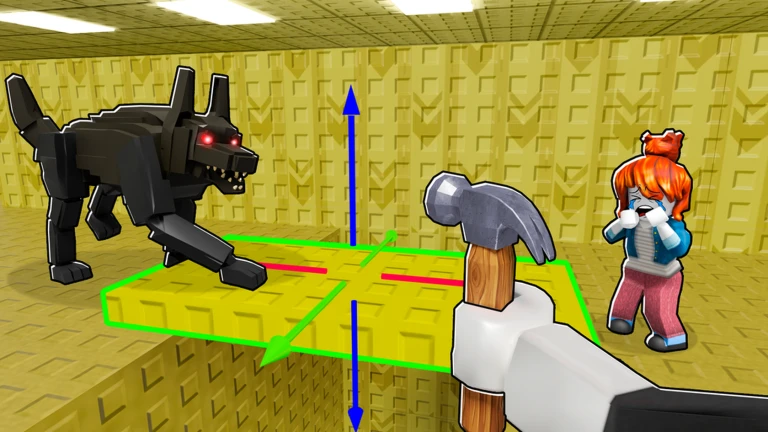
Official art shows a modular section selected with transform handles. The current community walkthrough supplies the missing keyboard detail: R rotates the selected building in that recording. Mobile and console bindings were not verified, so use the prompt shown by your client on those devices.

A player moves a yellow floor section with transform handles near a black quadruped monster
Official game media shows a modular section selected with transform handles. Downloaded from Roblox public media on August 4, 2026.

Quick answers

Questions players ask before the next build

What should I buy first in Build Your Backrooms?

The current tutorial highlights a free Yellow Corridor, then leads into a Yellow Turn placement and the first Wanderer purchase.

How do I rotate buildings?

On keyboard, the walkthrough reviewed August 4 shows R - Rotate. Mobile and console controls were not verified; follow the prompt displayed by your client.

Where do I place Wanderer?

Return Home, select Wanderer from the hotbar, and click a maze cell. The tutorial says the monster spawns in the selected cell and catches people inside the maze.